

Items in this category: Digitrax, DCC, control panel, extra circuits, bussed power, occupancy detection, signalling, power supplies and conversion, computer controller software.


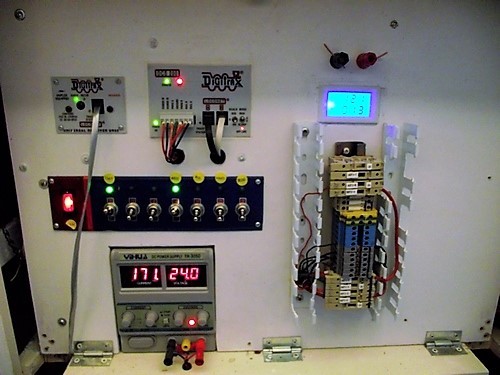


There are a number of different manufacturers to choose from for model train control. I did lots of research, read reports and user reviews, and sent many emails before deciding on Digitrax as my supplier. Digitrax provides all the hardware and software for DCC equipped layouts. Inter-communication is via "Loconet", an Ethernet type of protocol. Digitrax has good technical support.

A train layout using DCC doesn't have to be as complicated as I made it, shown in the photos below. I wanted things organized, flexible and usable. For example I have a switch (on the panel shown in photo 1) that turns on all the lights on the layout. I have another for just the accessories (usually motors). One switch applies proper voltage to a programming track for the locomotives. I employed industrial components (terminal blocks, Panduit) to make the wiring easy to follow and troubleshoot. It would have been easier to put various items closer to where they work but I wanted everything in one spot. For example the servo controller board is mounted in this cabinet instead of being close to the motors it controls. (It would be harder to troubleshoot if the board was buried in scenic material).
And besides, I made it complicated because I CAN!
And besides, I made it complicated because I CAN!


Indicates on computer screen if a zone (there are 18 zones) is occupied by a locomotive

Used to control switches (turnouts). I have 3 of these

Used to program locomotives and other stuff.
Also allows communication for computer control, via USB connection
Also allows communication for computer control, via USB connection

Identifies the locomotive (or other) equipment to the computer.
.
.

Controls lighting of signal masts, used for directing rail traffic.

Throttle plugs into this, or communicates to it via radio and
infra-red, 3 options.
infra-red, 3 options.

Supplies power to the tracks which also carries the signals to manipulate the operation of the locomotives.
Accepts 24 volt input, supplies about 15 volts for HO, at 5 Amps.
Accepts 24 volt input, supplies about 15 volts for HO, at 5 Amps.

Top of the line throttle controls trains and swiches via IR, radio, or hardwire
Click on an image to open up larger one, with caption
I use Digitrax DCC equipment throughout and use Train Controller for computer control. (Do not click image, no larger one available)
See below for details on each block
The computer software I use is Friewald Train-Controller Gold, a full function, does-everything-you-can-think-of-package that allows me to run many trains, all under computer control. Below is the Switchboard I created for my layout. Only the Simulator (black steam locomotive at top right of figure) is NOT necessary to operate my layout. The Simulator allows me to run my trains in simulation before I do it for real. Soooooo cool....

